Passing a Virtual-Agent Handoff Summary to Webex Contact Center
This document defines a provider-neutral contract for passing a handoff summary from a BYOVA virtual agent to Webex Contact Center (WxCC) when the call transfers to a human agent. The goal is to let the receiving agent understand the caller’s request without asking the caller to repeat it.
The contract applies to any virtual-agent provider. Each connector remains responsible for translating its provider’s terminal response into the canonical gateway fields described below.
Intended Agent Experience
When the virtual agent escalates a call, the human agent should receive a concise handoff summary:
- In the incoming-interaction popover before answering
- In the Interaction Control pane after answering
- Without depending on a provider-specific Agent Desktop widget
This document covers only the handoff summary behavior verified by this implementation.
Data Flow
Virtual-agent provider
        |
        | provider-specific terminal event and generated summary
        v
Provider connector
        |
        | canonical handoff summary
        v
BYOVA gateway
        |
        | final VoiceVAResponse with TRANSFER_TO_AGENT
        v
WxCC Virtual Agent V2 activity
        |
        | output-event metadata.summary
        v
Agent-viewable flow variable
        |
        +--> incoming-interaction popover
        +--> Interaction Control pane
The provider may generate the summary itself or return structured facts from which the connector builds a summary. The WxCC-facing response must not depend on which approach the provider uses.
Canonical Gateway Handoff Summary
Provider connectors should normalize terminal handoff data into one internal shape before the gateway creates the BYOVA response:
{
  "message_type": "transfer",
  "handoff": {
    "summary": "Caller wants to change the delivery address. The virtual agent did not modify the order. Verify the caller and update the address.",
    "language_code": "en-US"
  }
}
handoff.summary contains the text intended for the receiving agent. language_code is
optional and identifies the language used by the summary.
Connectors should not leak their provider’s raw terminal payload into the gateway contract. They should extract only the approved fields and normalize them into this shape.
BYOVA Transfer Response
The gateway should create one final VoiceVAResponse containing one
TRANSFER_TO_AGENT output event. The following pseudocode shows the intended wire shape:
{
  "response_type": "FINAL",
  "session_summary": {
    "text": "Caller wants to change the delivery address. The virtual agent did not modify the order. Verify the caller and update the address.",
    "language_code": "en-US"
  },
  "output_events": [
    {
      "event_type": "TRANSFER_TO_AGENT",
      "name": "transfer_requested",
      "metadata": {
        "summary": "Caller wants to change the delivery address. The virtual agent did not modify the order. Verify the caller and update the address."
      }
    }
  ]
}
The fields serve different purposes:
| Field | Purpose | Requirement |
|---|---|---|
output_events[].metadata.summary |
Makes the summary available to the WxCC flow as transfer metadata | Required for the validated Agent Desktop path |
session_summary |
Uses the dedicated BYOVA session-summary field | Recommended when a summary is available |
The summary is intentionally present in both session_summary and transfer metadata. The
dedicated field preserves the BYOVA semantic model, while metadata.summary supports the
current WxCC flow-variable and Agent Desktop path.
The relevant protocol definitions are:
WxCC Flow Mapping
In Flow Designer, the Virtual Agent V2 activity exposes transfer-event metadata through its
MetaData output. Map the normalized summary key to a custom String flow variable:
BYOVAHandoffSummary =
The Virtual Agent activity name is flow-specific; replace BYOVA_Virtual_Agent with the
actual activity name. Configure the custom variable as:
| Setting | Value |
|---|---|
| Type | String |
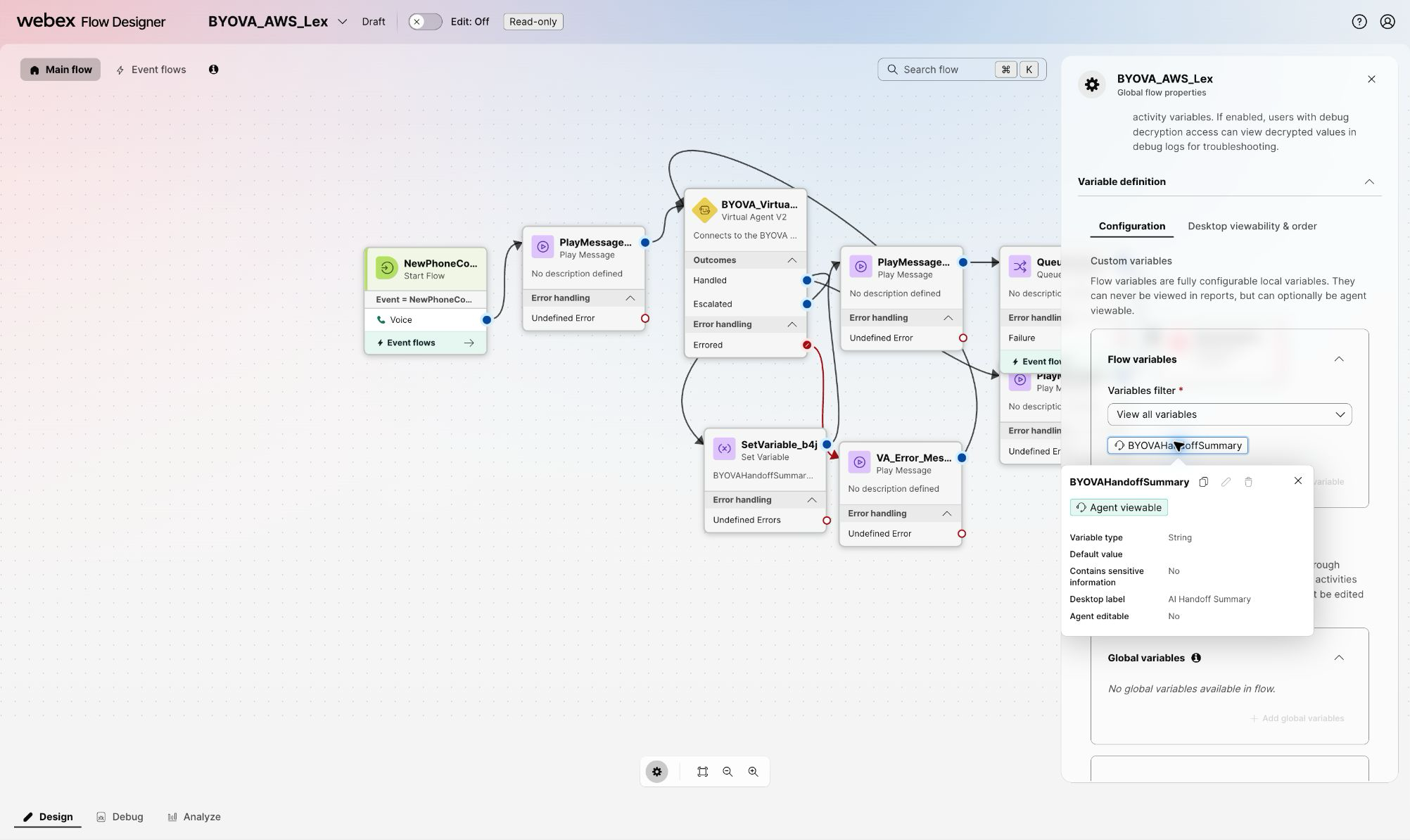
| Desktop label | AI Handoff Summary |
| Agent viewable | Enabled |
| Agent editable | Disabled |
These settings live in the flow’s Global flow properties. They do not require a custom Agent Desktop JSON layout.
1. Create the agent-viewable variable
Open Variable definition > Configuration, create the String variable, and leave its default value empty. The summary must be designed to exclude secrets, payment data, and other content that should not appear in an incoming offer. The following nonproduction example uses synthetic, non-sensitive content.
2. Copy the transfer metadata into the variable
On the Virtual Agent V2 Escalated branch, add a Set Variable activity before the
activity that queues the contact for a human agent. Select BYOVAHandoffSummary, choose
Set value, and enter the metadata expression shown above. Use the flow’s actual Virtual
Agent activity name in the expression.
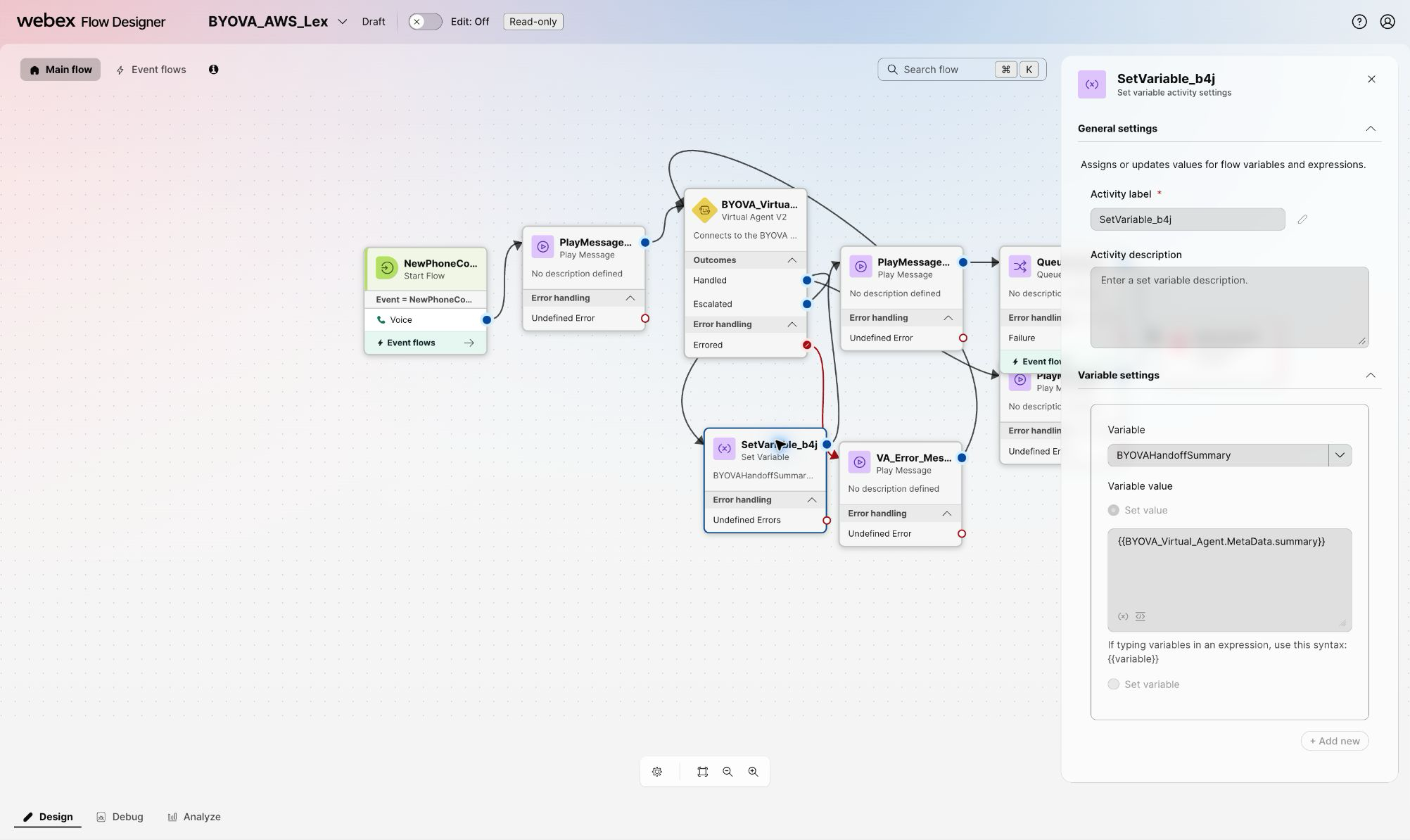
The surrounding nodes in this screenshot belong to a nonproduction example flow. The provider-neutral requirement is the selected variable and expression, not the example’s activity names or other branches.
Keep the human-routing path independent of the optional value:
- Connect the Set Variable success path to the normal human queue path.
- If the flow treats a missing nested
summarykey as an Undefined Error, connect that error path to the same human queue path, or guard the assignment with an equivalent condition. - Do not disconnect the contact or send it to a Virtual Agent failure branch only because the summary is absent.
- Do not invent a fallback summary. Leave the agent-viewable variable empty when no summary was supplied.
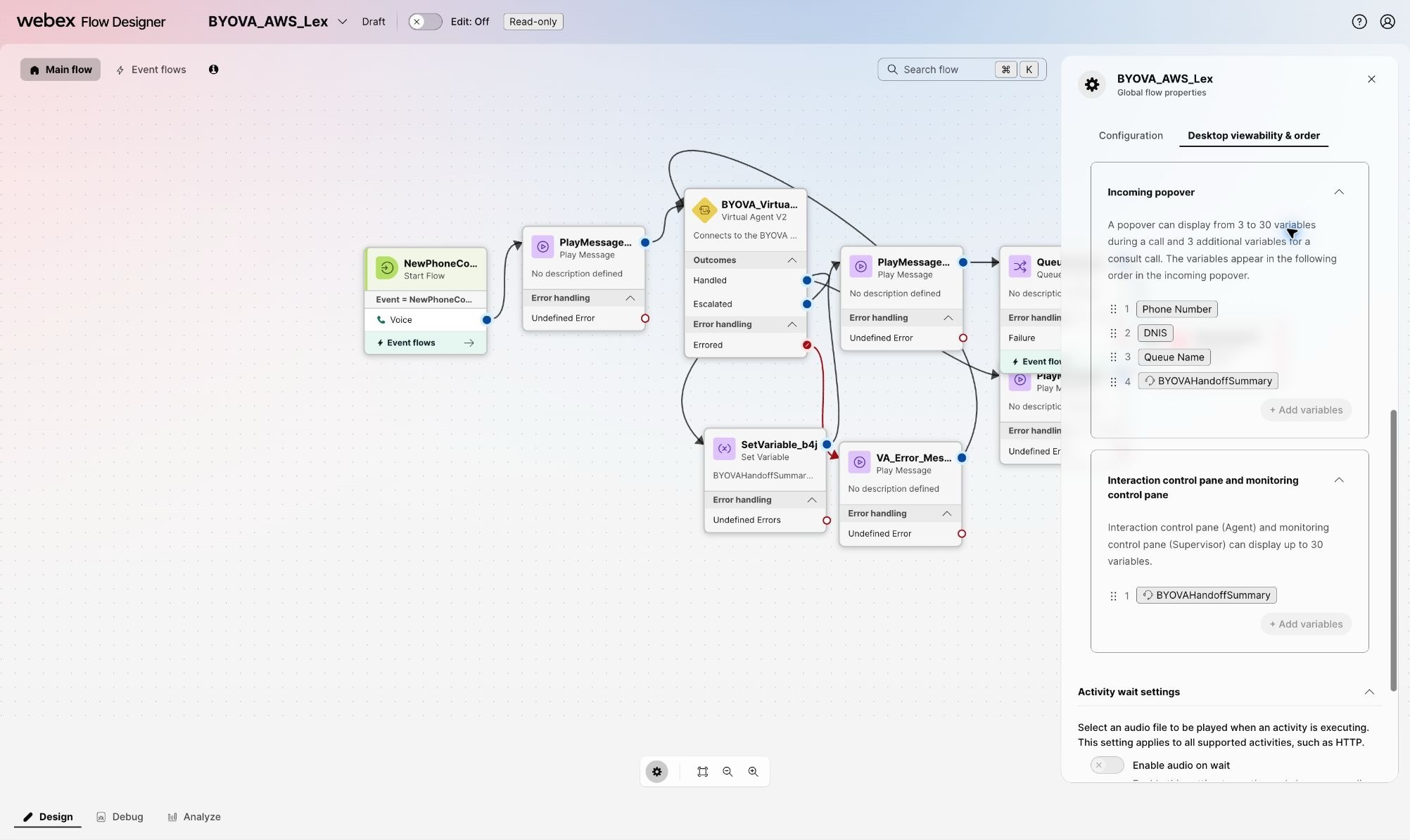
3. Select the Agent Desktop surfaces
Open Variable definition > Desktop viewability & order. Add
BYOVAHandoffSummary to both Incoming popover and Interaction control pane and
monitoring control pane, then place it in the desired order. Publish the flow after the
configuration has been validated.
The transfer must continue when the provider does not supply a summary; an absent summary is not a routing failure.
Validated Agent Desktop Behavior
The following screenshots were captured in a nonproduction WxCC organization with synthetic handoff content. They prove the WxCC metadata-to-flow-variable-to-desktop path. They do not prove that any specific provider generates a summary automatically.
Before the agent answers
The incoming-interaction popover includes AI Handoff Summary with the other request details. The narrow popover may truncate a long value, so the summary should lead with the caller’s request and requested next action.
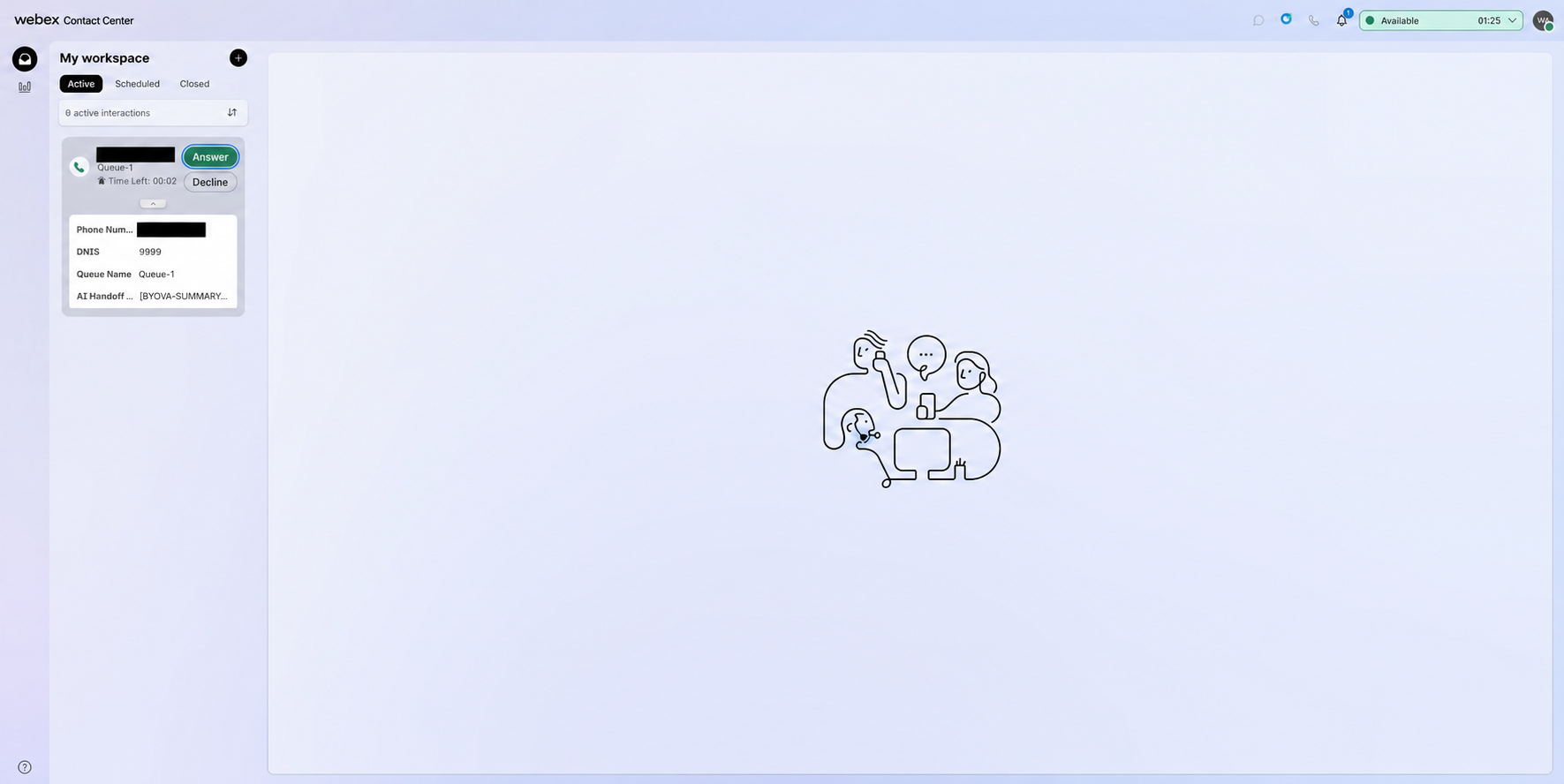
After the agent answers
The full summary appears at the top of the active interaction, directly below the call controls.
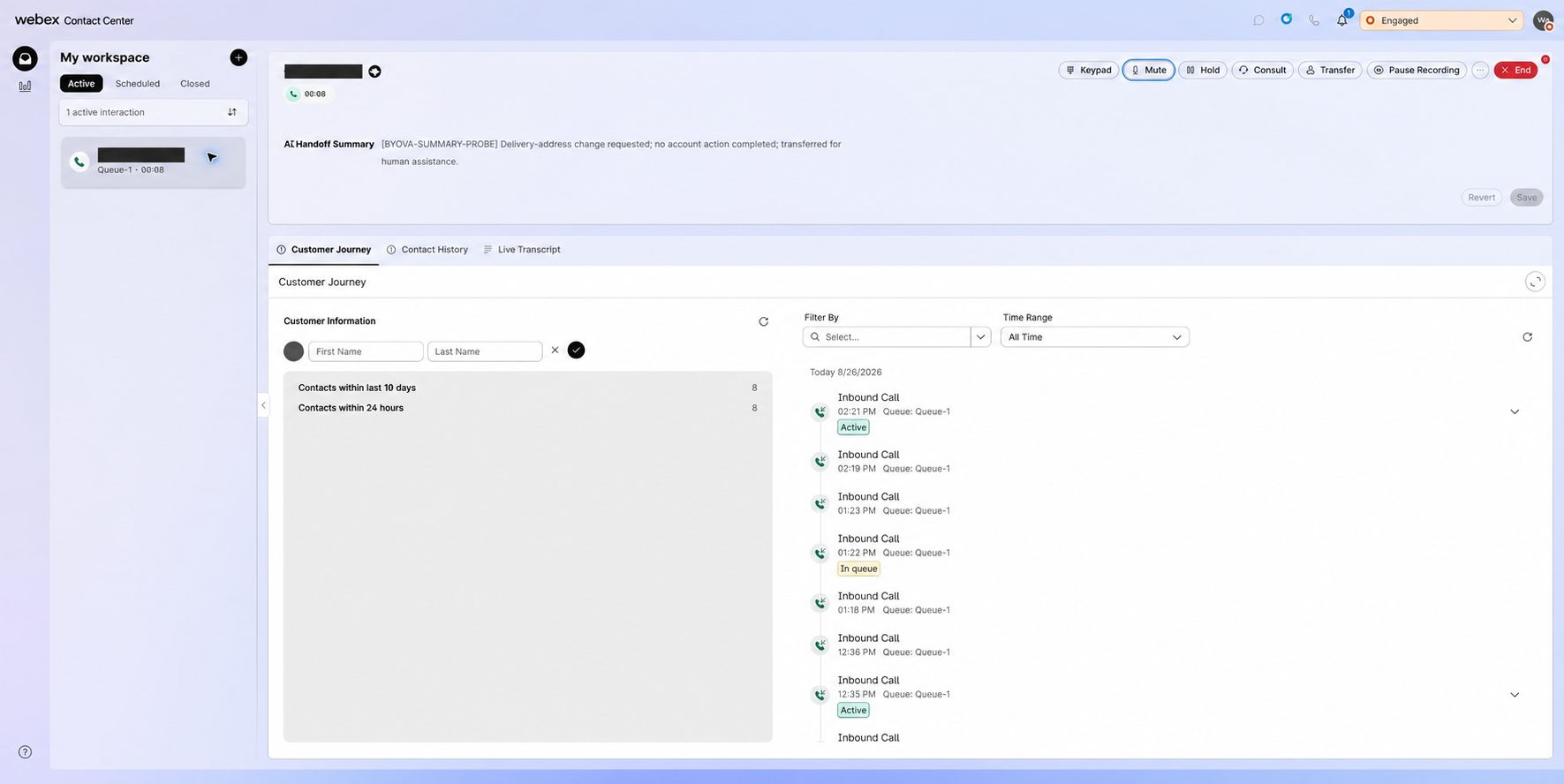
The synthetic marker in these screenshots was added by a development-only terminal insight probe. A production implementation must replace that probe with provider-neutral handoff normalization and pass-through.
Gateway Requirements
The production gateway implementation should:
- Accept a normalized handoff summary from every connector that can provide one.
- Create exactly one terminal
TRANSFER_TO_AGENToutput event. - Copy the summary into that event’s
metadata.summaryfield. - Populate
session_summarywith the same text and language when available. - Allowlist supported metadata fields rather than forwarding an arbitrary provider payload.
- Enforce configured size limits and valid scalar types.
- Never write summary content to logs, metrics, traces, or error messages.
- Preserve transfer behavior when the summary is missing, malformed, or too large.
The gateway should log only safe operational facts such as whether a field was present, its character count, the selected language, and whether validation accepted or omitted it.
Summary Content Guidance
A useful handoff summary should be factual, brief, and ordered for the receiving agent. It should include:
- Why the caller contacted the virtual agent
- Important information the caller supplied
- Actions the virtual agent completed or explicitly did not complete
- The reason for escalation
- The next action expected from the human agent
Do not include credentials, authentication tokens, payment data, unnecessary sensitive personal information, unsupported conclusions, or hidden provider diagnostics. Prefer plain text over Markdown because the Agent Desktop variable is rendered as text.
Verification
Automated coverage should verify:
- A transfer with a summary creates one transfer event containing
metadata.summary. - The same value appears in
session_summary. - A transfer without a summary still succeeds.
- Non-transfer responses do not receive handoff fields.
- Oversized or invalid values are omitted or truncated according to configuration.
- Summary text does not appear in logs.
- Provider-specific fields do not escape the connector boundary.
End-to-end acceptance should verify:
- The provider or test connector produces a synthetic handoff summary.
- The gateway emits a final response with one
TRANSFER_TO_AGENTevent. - The WxCC flow assigns
MetaData.summaryto the agent-viewable variable. - The incoming offer shows the summary before answer.
- The active interaction shows the full summary after answer.
- The call routes and completes normally when the summary is absent.
Use synthetic content for all nonproduction validation. Disable any terminal test probe after the test and restore the environment’s approved gateway release.